Tuesday, March 22, 2022

Headtracking/Panning FPV on Durafly EFXtra

High performance FPV cameras on RC airplanes have come a long way. The ability to remotely pan and tilt onboard cameras have greatly improved the FPV flying experience. And, having this remote control via head tracking control results in a natural view experience. Formation flying, scenic views, and even air combat are far more realistic as a result.

Here's a formation flight video clip of an inexpensive Head Tracking system driving a panning DJI goggles v2Caddix Nebula, mounted on a very fast Durafly EFXtra:


Here's a photo of the airplane and the larger camera pod. This pod has room for flight controller, GPS.

Here's some closeups of the pod and camera assembly (note the 4.5g servo used here)


And here's a photo of the head tracker which slides nicely into the 'standard' analog mount on DJI headset:

All the plastic parts are 3d printed and I continue to iterate on the design (Nebula Nano camera, gear types, size, weight):


I'll iterate a little more and then upload the designs to GitHub, ThingVerse along with setup, assembly instructions.


Monday, September 20, 2021

Adding battery voltage telemetry to FrSky RX6R with Radiomaster TX16S

Now that Combat 2 (HB1) has had its maiden flight, cut a ribbon, and survived a mid-air, it is time to add voltage telemetry to move beyond timed flight.  It turns out our ZOHD based speed controllers make this pretty easy.

Items you will need:

  • ZOHD 30A ESC
  • FrSky RX6R receiver
  • 4.7k ohm resistor
  • 1.0k ohm resistor
  • The FrSky header connector (the one without the programming plug -- supplied with the receiver)
  • Heat shrink, extra wire, zip ties, etc.
Important, the resistor divider above is configured to get a decent sensitivity for 3 or 4 cell batteries (max voltage should not exceed 3.3v at the A2 input,  for this divider this means max 18.8v battery voltage). Is possible to use other resistor values for higher voltage battery packs.

Here we see the ZOHD ESC as previously installed. What is nice is that extra 2 wire connector (red/black) is directly connected to the battery terminals! This sure cleans up the wiring.


Next solder a resistor divider like this.  Note that the two pins facing down will directly plug into that extra 2 wire connector. Cut them straight and of a good length for inserting into the connector.


Now locate the header cable included with the receiver and cut all the wires except green (actually double check your color code and ensure you keep the wire that will connect to A2 sensor input as seen in the receiver pinout diagram).


Insert the resistor divider into the connector (Important: the 4.7k resistor MUST be on the RED side and the 1.0k should be on the black side.  Inserting this in reverse will likely damage the receiver's A2 sensor input circuits)

Now, using a bit of a jumper wire and heat-shrink, insert the connector into the receiver header, solder an extension wire so the length is about the same as the ESC control cable, insulate, heat shrink, and zip tie as necessary.


Now, if the TX16S is already bound and sensors discovered, the A2 voltage should show some value (here we see 7.7) when the airplane is powered up.

To calibrate to the actual voltage, enter model setup, scroll to the sensor tab. Note A2 is rendering here. If you need to discover sensors, this is the page to do it on.

Lastly, calibrate the voltage divider. Connect a flight battery and also connect a cell voltage monitor (here we see 11.06V - yes an empty battery). Scroll TX down to the A2 sensor and click enter. The page shown will display, scroll down to the Ratio field, click enter and adjust the ratio so the voltage displayed in the upper left of the display matches the battery voltage.  That's it! 

Next, you can further program the transmitter to emit voltage values, low voltage alarms. It might be interesting to apply a sag-compensated curve to the voltage so you don't have to exit the combat session too soon.

Friday, September 10, 2021

Configuring FrSky RX6R with Radiomaster TX16S transmitter

Here's a short post on the steps needed to use a very nice FrSky RX6R receiver with a Radiomaster TX16s transmitter.

  1. Ensure the transmitter is running compatible OpenTX firmware
  2. Upload the appropriate FrSky firmware to the Transmitter (I used ACCST_2.1.1_FCC). This should be uploaded to the 'FIRMWARE' subtree. Firmware should be available here: FrSky downloads
  3. Modify the wiring of the included SBus to servo-style connector to be yellow, black, red. This ensures correct wiring from the pins inside the Transmitter:
  4. Next create a new model in the transmitter (I use a dedicated one I call 'flash') which has the model set up for external RF in PPM mode. This will configures the pins in the external RF compartment to power the receiver in standalone mode:
  5. Now, connect the receiver to the external RF ports as shown (yellow on the 'bottom'). This will power up the receiver if wired correctly:
  6. Now, prepare for firmware update.  Enter 'Sys' mode, move right to the flash icon, and scroll down to select [FIRMWARE]:
  7. Enter this subtree and scroll down to the ACCST firmware (for US, the FCC version is required):
  8. Next select the firmware and see a pop-up that says "Flash External Module":
  9. At this point the radio lights should change to green and a progress bar of writing to flash should be displayed:
  10. Once the above completes, we are ready to bind the receiver. Select the receiver mode FRSKYX2 - D16
  11. Next prepare receiver for binding.  Here I set it up on an aircraft and power up the receiver while pressing the receiver button (actually when done correctly, the red light will be steady on):
  12. And lastly, select 'bind' and set for channels 1-8:
  13. The receiver led flips to blue if bind is complete.  At this point, power cycle the receiver and do a fine tune and range check. Add in hardware failsafe (set transmitter to failsafe positions, power up the receiver and press the button on the receiver within 10 seconds).  You should also set failsafe in the transmitter.
  14. Then you can discover the sensors and get receiver telemetry from the sensor sub-menu of the model.
  15. (TODO: describe how to prepare a voltage divider so you can get battery voltage telemetry too.)

Sunday, June 25, 2017

NextThingCo ChipPro kernel debugging with kgdb -- It can be done!

Lately, I've been working on an embedded platform IoT experiment. And for this I have selected ChipPro http://getchip.com platform. Is definitely an improvement over some of the other platforms and the $16 current price hard to beat. Some of the notable features include:

  • Decent ARM processor at 1ghz
  • 256mb of ram
  • 512mb of flash
  • Plenty of I/O
  • A nice power controller module
  • And a very nice dual channel 802.11 solution
  • A tidy buildroot platform more or less ready to extend
Anyway, I am building some IoT applications (with AWS Greengrass ) to explore continuous security patterns, over the air upgrade and mesh architectures.

As is the case with lower level hardware solutions, I'm extending a linux drivers and introducing problems along the way. Eventually needing to do low level startup debugging. Not much documentation on this so I figured I'd dig in and work it out.

Yes it can be done.  Summary:
  • Build the platform with debugging enabled
  • Load this image onto the target as usual
  • Modify boot args to start up and enter kdb
  • Then through the console, flip over to kgdb
  • And launch gdb-multiarch inside the buildroot VM

Steps to get kernel debugging enabled

This all assumes you are familiar with ChipPro buildroot builds as shown here: 

Configure the build to include kernel debugging

Add these entries to the linux-new.config (inside your clone of gadget-buildroot)
CONFIG_DEBUG_INFO=y
CONFIG_MAGIC_SYSRQ=y
# CONFIG_DEBUG_RODATA is not set
CONFIG_FRAME_POINTER=y
CONFIG_KGDB=y
CONFIG_KGDB_SERIAL_CONSOLE=y
CONFIG_KGDB_KDB=y
CONFIG_KDB_KEYBOARD=y

Rebuild the kernel from scratch

scripts/build-gadget make clean
scripts/build-gadget make xxx_defconfig
scripts/build-garget make -s

Load the newly built image onto system flash

(following instructions from gadget-buildroot)

Modify boot args to enter kdb on early boot

Now, assuming you have a serial port attached to your build system, you should be able to connect to the serial console to watch boot, etc. For me on a Mac this is:
screen /dev/tty.usbserial 115200
Here is where you can interrupt boot sequence at the firmware load, modify boot environments, etc. You can either interrupt the boot sequence (e.g. if your code updates panic the kernel early). or you can use fw_printenv, fw_setenv which are commands in the target's image.

The environment parameters (fw_printenv) should show one entry like this:
bootargs=root=ubi0:rootfs rootfstype=ubifs rw ubi.mtd=4 lpj=5009408 ubi.fm_autoconvert=1 quiet
Now, modify this entry (using fw_setenv) to enter kdb, using the serial console on boot:
root=ubi0:rootfs rootfstype=ubifs rw ubi.mtd=4 lpj=5009408 ubi.fm_autoconvert=1 kgdboc=ttyS0,115200 kgdbwait
At this point if all is well, when you reset the device it should enter kdb.

Use gdb to debug the kernel

Several things need to happen here. You need to get the serial console access inside the docker container that does the build. Depending on the VM you are using, the steps to get the USB serial port visible in the buildroot guest vary. Since I'm using VirtualBox on a Mac, I wound up enabling USB on the guest and restarting it. Native docker support will be a bit simpler.

Anyway, once the port is available to the guest, you need to alter scripts/build-gadget to include the device. Something like this on the docker run command in the build-gadget script (the --device line):
docker run \
--rm \
--env BR2_DL_DIR=/opt/dlcache/ \
--volume=gadget-build-dlcache:/opt/dlcache/ \
--volume=gadget-build-output:/opt/output \
--volume=${IMAGE_DIR}:/opt/output/images \
--volume=${GADGET_DIR}:/opt/gadget-os-proto \
--name=gadget-build-task \
-w="/opt/gadget-os-proto" \
--device=/dev/ttyUSB0 \
Now, you will need to enter the guest interactively. The best way to do this is (from the gadget-buildroot top level directory)
TERM=yes ./scripts/build-gadget bash
Now you should install screen and gdb-multiarch (TODO this should be part of the build-container)
apt update
apt-get install screen gdb-multiarch 
 Now, connect to the serial console from inside the guest
screen /dev/ttyUSB0 115200
And boot up the device to kdb.  And then flip the console over to kgdb (by entering 'kgdb' at the kdb prompt). At this point you need terminate screen (terminate, not detach -- otherwise complaints about port in use).

Now debug away:

In the guest, change over to the linux directory of the build.  This is something like /opt/output/build/linux-...  And then start up gdb in cross platform mode:
gdb-multiarch 
set arch arm
file vmlinux
target remote /dev/ttyUSB0 
That should do it, you are in an early boot intercept using a remote debugger from inside a guest OS that has all the necessary source!

Happy debugging!

Tuesday, May 31, 2016

Efficient Apple Watch CMSensorRecorder transport to AWS

Well, I have come full circle. A long time ago, this experiment ran through Rube Goldberg system #1:

  • Dequeue from CMSensorRecorder
  • Pivot the data
  • Send it via WCSession to the iPhone
  • iPhone picked up the data and queued it locally for Kinesis
  • Then the Kinesis client transported data to Kinesis
  • Which had a Lambda configured to dequeue the data
  • And write it to DynamoDB
Then, I flipped the data around in an attempt to have the Watch write directly to DynamoDB:
  • Dequeue from CMSensorRecorder
  • Pivot the data to a BatchPutItem request for DynamoDB
  • Put the data to DynamoDB
  • (along the way run the access key Rube Goldberg machine mentioned earlier)
The problems with both of these approaches are the cost to execute on the Watch and the Watch's lack of background processing. This meant it was virtually impossible to get data dequeued before the Watch app went to sleep.

I did a little benchmarking over the weekend and found that brute force dequeue from CMSensorRecorder is fairly quick. And the WCSession sendFile support can run in the background, more or less. So, I will now attempt an alternate approach:
  • Dequeue from CMSensorRecorder
  • Minimal pivot of data including perhaps raw binary to a local file
  • WCSession:sendFile to send the file to the iPhone
  • Then iPhone gets the file and sends it itself to AWS (perhaps a little pivot, perhaps S3 instead of DynamoDB, etc.)
  • (along the way a much simpler access key machine will be needed)
The theory is that this'll get the data out of the Watch quickly during its limited active window.

We'll see...

Saturday, May 28, 2016

The limits of AWS Cognito

Well, after a slight hiatus, I spent a little time understanding how to use AWS Cognito in an application. I've now got a more or less running Cognito-as-STS-token-generator for the Apple Watch. Features:

  • Wired to any or all of Amazon, Google, Twitter or Facebook identity providers
  • Cognito processing occurs on the iPhone (hands STS tokens to Watch as Watch can't yet run the AWS SDK)
  • Leverage Cognito's ability to 'merge' identities producing a single CognitoID from multiple identity providers
  • Automatic refresh of identity access tokens
Here's the iPhone display showing all the identity providers wired:

Ok, the good stuff. Here what the access key flow now looks like:


There are a lot of actors in this play. They key actor for this article is the IdP. Here, as a slight generalization across all the IdPs, we have a token exchange system. The iPhone maintains the long lived IdP session key from the user's last login.  Then, the iPhone performs has the IdP exchange the session key for a short-lived access key to present to Cognito. For IdP like Amazon and Google, the access key is only good for an hour and must be refreshed...

Let me say that again; today, we need to manually refresh this token for Cognito before asking Cognito for an updated STS token! Cognito can't do this! FYA read Amazon's description here: "Refreshing Credentials from Identity Service" 

Especially in our case, where our credentials provider (Cognito) is merely referenced by the other AWS resources, we need to intercept the Cognito call to make sure that on the other side of Cognito, the 'logins' are up to date.

So, I replumbed the code to do just this (the 'opt' section in the above diagram). Now, a user can log in once on the iPhone application and then each time the Watch needs a token, the whole flow tests whether or not an accessKey needs to be regenerated.

For reference, here's the known lifetimes of the various tokens and keys:
  • The Watch knows its Cognito generated STS Token is good for an hour
  • Amazon accessTokens are good for an hour (implied expire time)
  • Google accessToken is good until an expire time (google actually returns a time!)
  • Twitter doesn't have expire so its accessKey is unlimited
  • Facebook's token is good for a long time (actually the timeout is 60 days)
  • TODO: do any of the IdPs enforce idle timeouts? (e.g. a sessionKey has to be exchanged within a certain time or it is invalidated...)
So, with all these constants, and a little lead time, the Watch->iPhone->DynamoDB flow looks pretty robust. The current implementation is still limited to having the Watch ask the iPhone for the STS since I haven't figured out how to get the various SDKs working in the Watch. I don't want to rewrite all the IdP fetch codes, along with manual calls to Cognito.

Plus, I'm likely to move the AWS writes back to the iPhone as the Watch is pretty slow.

The code for this release is here. The operating code is also in TestFlight (let me know if you want to try)

Known bugs:
  • Google Signin may not work when the app is launched from the Watch (app crashes)
  • Facebook login/logout doesn't update the iPhone status section
  • The getSTS in Watch is meant to be pure async -- I've turned this off until its logic is a bit more covering of various edge cases.
  • The webapp should also support all 4 IdP (only Amazon at the moment)


Tuesday, February 23, 2016

Wow: Multiple Identity Providers and AWS Cognito

I've finally found time to experiment with multiple identity providers for Cognito. Mostly to understand how a CognitoId is formed, merged, invalidated. It turns out this is a significant finding, especially when this Id is used, say, as a primary key for data storage!

Recall, the original sensor and sensor2 projects were plumbed with Login With Amazon as the identity provider to Cognito. This new experiment adds GooglePlus as a second provider. Here you can see the test platform on the iPhone:

Keep in mind that for this sensor2 application, the returned CognitoId is used as the customer's key into the storage databases. Both for access control and as the DynamoDB hash key.

The flow on the iPhone goes roughly as follows:
  • A user can login via one or both of the providers
  • A user can logout
  • A user can also login using same credentials on a different devices (e.g. another iPhone with the application loaded)
Now here's the interesting part. Depending on the login ordering, the CognitoId returned to the application (on the watch in this case) can change! Here's how it goes with my test application (which includes "Logins" merge)
  • Starting from scratch on a device
  • Login via Amazon where user's Amazon identity isn't known to this Cognito pool:
    • User will get a new CognitoId allocated
  • If user logs out and logs back in via Amazon, the same Id will be returned
  • If the user now logs into a second device via Amazon, the same Id will be returned
  • (so far this makes complete sense)
  • Now, if the user logs out and logs in via Google, a new Id will be returned
  • Again, if the user logs out and in again and same on second device, the new Id will continue to be returned
  • (this all makes sense)
  • At this point, the system thinks these are two users and those two CognitoIds will be used as different primary keys into the sensor database...
  • Now, if the user logs in via Amazon and also logs in via Google, a CognitoId merge will occur
    • One, or the other of those existing Ids from above will be returned
    • And, the other Id will be marked via Cognito as disabled
    • This is a merge of the identities
    • And this new merge will be returned on other devices from now on, regardless of whether they log in solely via Amazon or Google
    • (TODO: what happens if user is logged into Amazon, has a merged CognitoId and then they log in using a second Google credential?)
This is all interesting and sort of makes sense -- if a Cognito context has a map of logins that have been associated, then Cognito will do the right thing. This means that some key factors have to be considered when building an app like this:
  • As with my application, if the sensor database is keyed by the CognitoId, then there will be issues of accessing the data indexed by the disabled CognitoId after a merge
  • TODO: will this happen with multiple devices going through an anonymous -> identified flow?
  • It may be that additional resolution is needed to help with the merge -- e.g. if there is a merge, then ask the user to force a join -- and then externally keep track of the merged Ids as a set of Ids -> primary keys for this user...
Anyway, I'm adding in a couple more providers to make this more of a ridiculous effort. After which I'll think about resolution strategies.


Wednesday, February 17, 2016

TestFlight version of sensor2 is available in Apple Store

The current version of sensor2 is available as a test flight application if you'd like to try it out. This will give you a quick try of the basic sensor capture and display in the minimal website.

Recall it uses Amazon Login as the sole identity provider right now.

Drop me a note, or comment here if you'd like to try the TestFlight version.


Sunday, February 7, 2016

sensor2 code cleanup -- you can try it too

After a bit of field testing, I've re-organized the sensor2 code to be more robust. Release tag for this change is here. Major changes include:
  • The Watch still sends CMSensorRecorder data directly to DynamoDB
  • However, the Watch now asks the iPhone for refreshed AWS credentials (since the AWS SDK isn't yet working on Watch, this avoids having to re-implement Cognito and login-with-amazon). This means that with today's code, the Watch can be untethered from the iPhone for up to an hour and can still dequeue records to DynamoDB (assuming the Watch has Wi-Fi access itself)
  • If the Watch's credentials are bad, empty or expired and Watch can't access the iPhone or the user is logged out of the iPhone part of the app, then Watch's dequeuer loop is stopped
  • Dependent libraries (LoginWithAmazon) are now embedded in the code
  • A 'logout' on the phone will invalidate the current credentials on the Watch
This code should now be a bit easier to use for reproducing my experiments. Less moving parts, simpler design. I'll work on the README.md a bit more to help list the steps to set up.

And finally, this demonstrates multi-tenant isolation of the data in DynamoDB. Here's the IAM policy for logged in users:

{
    "Version": "2012-10-17",
    "Statement": [
        {
            "Effect": "Allow",
            "Action": [
                "mobileanalytics:PutEvents",
                "cognito-sync:*",
                "cognito-identity:*"
            ],
            "Resource": [
                "*"
            ]
        },
        {
            "Sid": "Stmt1449552297000",
            "Effect": "Allow",
            "Action": [
                "dynamodb:BatchWriteItem",
                "dynamodb:UpdateItem",
                "dynamodb:Query"
            ],
            "Resource": [
                "arn:aws:dynamodb:us-east-1:499918285206:table/sensor2"
            ],
            "Condition": {
                "ForAllValues:StringEquals": {
                    "dynamodb:LeadingKeys": [
                        "${cognito-identity.amazonaws.com:sub}"
                    ]
                }
            }
        }
    ]
}

In the above example the important lines are the condition -- this condition entry enforces that only rows with HashKey the same as the logged in user's cognitoId will be returned. This is why we can build applications with direct access to a data storage engine like DynamoDB!

You can read the details of IAM+DynamoDB here.

Anyway, back to performance improvements of the dequeue process. Everything is running pretty good, but the Watch still takes a long time to get its data moved.

Wednesday, January 6, 2016

A note on sensor2 dequeue performance

I've examined sensor2 dequeue performance. Some interesting observations indeed!
  • A single dequeue loop (1250 samples for 25 seconds) time takes a bit over 7 seconds
  • A little under 1 second of this time is getting data from CMSensorRecorder
  • Around 4 seconds is required to prepare this data
  • The time to send the samples to DynamoDB depends on the network configuration:
    • 3 - 6 seconds when the Watch is proxying the network through iPhone using LTE network (with a few bars of signal strength)
    • 2 - 4 seconds when the Watch is proxying the network through iPhone (6s plus) and my home WiFi
    • Around 1.5 seconds when the Watch is directly connecting to network using home WiFi

Speeding up the data preparation will help some.  I will set a goal of 1 second:
  • Hard coded JSON serializer
  • Improvements to the payload signer
  • Reduce the HashMap operations (some clever pivoting of the data)

Monday, January 4, 2016

New "serverless" site to explore sensor data

I have updated the UI to parse and render the data from the new data model. You can try it out here.


Recall the data flow is:

  • CMSensorRecorder is activated directly on the Watch
  • When the application's dequeue is enabled, the dequeued events are:
    • Parsed directly into our DynamoDB record format
    • Directly sent to DynamoDB from the Watch
And this pure static website directly fetches those records and pivots the data in a vis.js and d3.js format for display.

Next up:

  • Get AWS Cognito into the loop to get rid of the long lived AWS credentials
  • Work on the iOS framework memory leaks
  • Speed up the dequeue (or, resort to a Lambda raw data processor)

Sunday, January 3, 2016

Progress: CMSensorRecorder directly to DynamoDB

Relative to before, the pendulum has swung back to the other extreme: a native WatchOS application directly writing to AWS DynamoDB.  Here, we see a screen grab with some events being sent:


This has been an interesting exercise. Specifically:
  • With iOS 9.2 and WatchOS 2.1, development has improved
  • However, I can't yet get the AWS iOS SDK to work on the Watch directly
  • So, I have instead written code that writes directly to DynamoDB
    • Including signing the requests
    • Including implementing low level API for batchWriteItem and updateItem
  • I have also redone the application data model to have a single DynamoDB row represent a single second's worth of data with up to 50 samples per row
    • Initially, samples are indexed using named columns (named by the fraction of a second the sample is in)
    • Later this should be done as a more general documentDB record
    • This approach is a more efficient use of DynamoDB -- provisioning required is around 2 writes/second per Watch that is actively dequeuing (compared to 50 writes/second when a single sample is stored in a row)
  • This application also uses NSURLSession directly
  • This means that the Watch can send events to DynamoDB using configured WiFi when the iPhone is out of range!
  • I have also redone the command loop using GCD dispatch queues (instead of threads)
Anyway, it appears to be doing the right thing. Data is being recorded in CMSensorRecorder, the dequeue loop is processing data and transmitting up to 1250 samples (25 seconds) of data per network call. The custom request generator and call signing are doing the right thing. Perhaps a step in the right direction? Not quite sure:
  • I see that the actual on-Watch dequeue processing takes about 6 seconds for 25 seconds worth of data. Since all of the data preparation must occur on the Watch (there is no middle man), the additional work of pivoting the data, preparing the DynamoDB request are borne by the Watch.
  • Profiling shows the bulk of this processing time is in JSON serialization!
  • Another approach would be minimal processing on the Watch.  e.g. "dump the raw data to S3" and let an AWS Lambda take care of the detailed processing. This is probably the best approach although not the cheapest for an application with many users.
  • I'm now running tests long enough to see various memory leaks! I've been spending a bit of time with the memory allocator tools lately...
    • I have run into a few with the NSURLSession object
    • The JSON serializer also appears to leak memory
    • Possibly NSDateFormatter also is leaking memory
Here's what a dequeue loop looks like in the logs. You can see the blocks of data written and the loop processing time:

Jan  3 21:05:11 Gregs-AppleWatch sensor2 WatchKit Extension[152] <Warning>: dequeueLoop(1)
Jan  3 21:05:11 Gregs-AppleWatch sensor2 WatchKit Extension[152] <Warning>: flush itemCount=23, minDate=2016-01-04T05:01:54.557Z, maxDate=2016-01-04T05:01:54.998Z, length=2621
Jan  3 21:05:12 Gregs-AppleWatch sensor2 WatchKit Extension[152] <Warning>: data(Optional("{}"))
Jan  3 21:05:13 Gregs-AppleWatch sensor2 WatchKit Extension[152] <Warning>: commit latestDate=2016-01-04 05:01:54 +0000, itemCount=23
Jan  3 21:05:13 Gregs-AppleWatch sensor2 WatchKit Extension[152] <Warning>: dequeueLoop(2)
Jan  3 21:05:13 Gregs-AppleWatch sensor2 WatchKit Extension[152] <Warning>: flush itemCount=49, minDate=2016-01-04T05:01:55.018Z, maxDate=2016-01-04T05:01:55.980Z, length=5343
Jan  3 21:05:14 Gregs-AppleWatch sensor2 WatchKit Extension[152] <Warning>: data(Optional("{}"))
Jan  3 21:05:14 Gregs-AppleWatch sensor2 WatchKit Extension[152] <Warning>: commit latestDate=2016-01-04 05:01:55 +0000, itemCount=72
Jan  3 21:05:15 Gregs-AppleWatch sensor2 WatchKit Extension[152] <Warning>: dequeueLoop(3)
Jan  3 21:05:20 Gregs-AppleWatch sensor2 WatchKit Extension[152] <Warning>: flush itemCount=1250, minDate=2016-01-04T05:01:56.000Z, maxDate=2016-01-04T05:02:20.988Z, length=88481
Jan  3 21:05:23 Gregs-AppleWatch sensor2 WatchKit Extension[152] <Warning>: data(Optional("{\"UnprocessedItems\":{}}"))
Jan  3 21:05:23 Gregs-AppleWatch sensor2 WatchKit Extension[152] <Warning>: commit latestDate=2016-01-04 05:02:20 +0000, itemCount=1322
Jan  3 21:05:23 Gregs-AppleWatch sensor2 WatchKit Extension[152] <Warning>: dequeueLoop(4)
Jan  3 21:05:30 Gregs-AppleWatch sensor2 WatchKit Extension[152] <Warning>: flush itemCount=1249, minDate=2016-01-04T05:02:21.008Z, maxDate=2016-01-04T05:02:45.995Z, length=88225
Jan  3 21:05:32 Gregs-AppleWatch sensor2 WatchKit Extension[152] <Warning>: data(Optional("{\"UnprocessedItems\":{}}"))
Jan  3 21:05:32 Gregs-AppleWatch sensor2 WatchKit Extension[152] <Warning>: commit latestDate=2016-01-04 05:02:45 +0000, itemCount=2571

And here is what a record looks like in DynamoDB. This shows the columnar encoding of a few of the X accelerometer samples:


I have a checkpoint of the code here. Note that this code is somewhat hard coded for writing only to my one table with only AWS authorizations to write.

TODO:
  • Update the UI to help explore this data
  • See if there is a more efficient use of the JSON serializer
  • Examine some of the framework memory leaks
  • Try to speed up the dequeue to be better than 6 seconds of wall clock for 25 seconds of data.

Thursday, November 19, 2015

CMSensorRecorder from Watch to AWS

I've done a couple of experiments with the direct networking from the WatchOS 2.0 using NSURLSession. Based on the results, I now have a strategy for getting the iPhone out of the loop.

Recall the current plumbing looks like this:

  • CMSensorRecorder data collected in Watch
  • Dequeued by a native application on the Watch
  • Sent via WCSession to iPhone
  • iPhone uses AWS KinesisRecorder to buffer received events
  • KinesisRecorder sends to AWS (using Cognito credentials)
  • Kinesis is dequeued to an AWS Lambda
  • The Lambda stores the records to DynamoDB (using a fixed IAM role)
This is fine, but has a lot of moving parts. And more importantly, Kinesis is provisioned at expected throughput and you pay by the hour for this capacity.

My next experiment will look like this:
  • CMSensorRecorder data collected in Watch
  • Dequeued by a native application on the Watch
  • Sent directly to AWS IoT (using on-watch local long lived IAM credentials)
  • An IoT rule will send these events to Lambda
  • The Lambda stores the records to DynamoDB (using a fixed IAM role)
The important difference here is that IoT is charged based on actual use, not provisioned capacity. This means the effective costs are more directly related to use and not expected use!

Also, the Watch will be able to directly transmit to AWS instead of going through the iPhone (well, it does proxy through its paired phone if in range, otherwise it goes direct via WIFI if a known network is near). This feature will be an interesting proof of concept indeed.

Anyway, for this first experiment the writes to IoT are via http POST (not via MQTT protocol). And authentication is via long lived credentials loaded into the Watch, not Cognito. This is primarily because I haven't yet figured out how to get the AWS IoS SDK to work on the Watch (and the iPhone at the same time). So, I am instead using low-level AWS Api calls. I expect this will change with a future release of the SDK.

I have toyed with the idea of having the Watch write directly to DynamoDB or Lambda instead of going through IoT. Since the Watch is already buffering the sensor data, I don't really need yet another reliable queue in place. Tradeoffs:
  1. Send via IoT
    • + Get Kinesis-like queue for reliable transfer
    • + Get some runtime on IoT and its other capabilities
    • - Paying for another buffer in the middle
  2. Send direct to Lambda
    • + One less moving part
    • - To ensure sending data, need to make a Synchronous call to Lambda which can be delayed when writing to DynamoDB, not sure how well this will work on networks in the field
  3. Send direct to DynamoDB
    • + The lowest cost and least moving parts (and lowest latency)
    • - DynamoDB batch writes can only handle 25 items (0.5 seconds) of data
Note: on DynamoDB, earlier I had discussed a slightly denormalized data storage scheme. One where each second of data is recorded on one dynamoDB row (with separately named columns per sub-second event). Since DynamoDB can do no-clobber updates, this is a nice tradeoff of rows vs data width. This would change the data model and the reader would need to take this into account, but this may make the most sense no matter what. Basically doing this gets better utilization of a DynamoDB 'row' by compacting the data as much as possible. This probably reduces the overall cost of using DynamoDB too as the provisioning would, in general, be reduced. So, I may just re-do the data model and go direct to DynamoDB for this next POC.

Stay tuned!

Thursday, October 29, 2015

Sensor: You Can Try Out Some Real Data

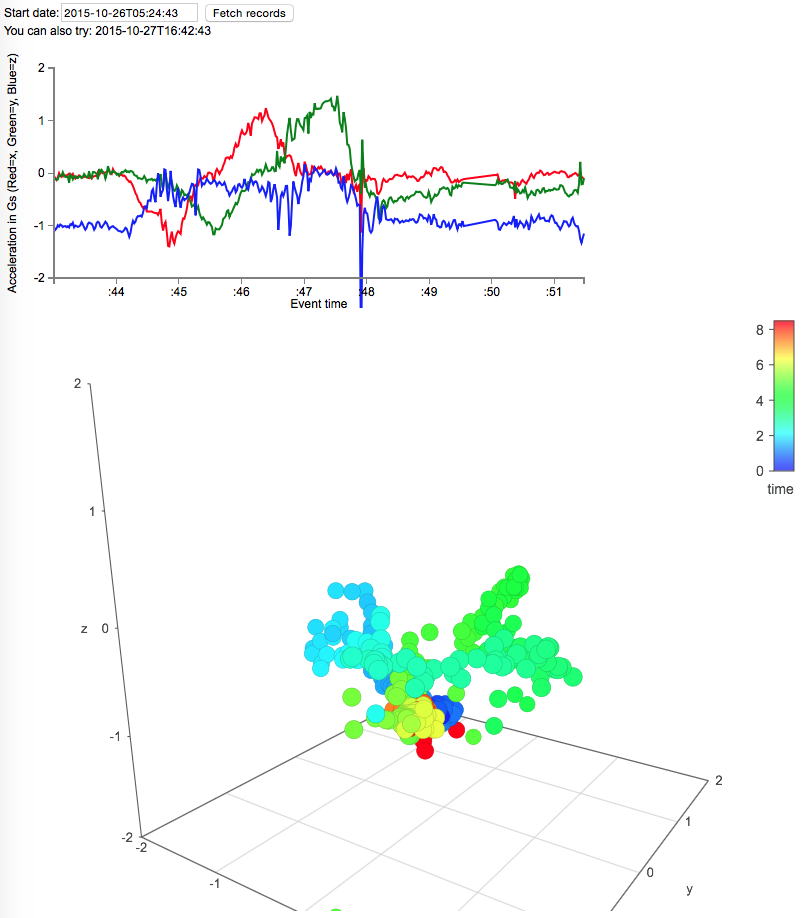
I've set up a rendering of some actual sensor data in a couple of formats:

  • A line chart with X as time and Y as 3 lines of x, y, z acceleration
  • A 3d plot of x, y, z acceleration with color being the sample time
Is interesting to see the actual sensor fidelity in a visual form. CMSensorRecorder records at 50 samples per second and the visualizations are 400 samples or 8 seconds of data.

You can try out the sample here at http://test.accelero.com There are a couple of suggested start times shown on the page.  Enter a time and hit the Fetch button. Recall this fetch button allows the browser to directly query DynamoDB for the sample results. In this case anonymously and hard coded to this particular user's Cognito Id...


Once the results are shown you should be able to drag around on the 3d plot to see the acceleration over time.

The above timeslice is a short sample where the watch starts flat and is rotated 90 degrees in a few steps. If you try out the second sample you will see a recording of a more circular motion of the watch.

Note that d3.js is used for the line charts and vis.js is used for the interactive 3d plot.

Sunday, October 25, 2015

Apple Watch Accelerometer displayed!

There you have it! A journey started in June has finally rendered the results intended. Accelerometer data from the Watch is processed through a pile of AWS services to a dynamic web page.

Here we see the very first rendering of a four second interval where the watch is rotated around its axis. X, Y and Z axes are red, green, blue respectively. Sample rate is 50/second.

The accelerometer data itself is mildly interesting. Rendering it on the Watch or the iPhone were trivial exercises. The framework in place is what makes this fun:
  • Ramping up on WatchOS 2.0 while it was being developed
  • Same with Swift 2.0
  • Getting data out of the Watch
  • The AWS iOS and Javascript SDKs
  • Cognito federated identity for both the iPhone app and the display web page
  • A server-less data pipeline using Kinesis, Lambda and DynamoDB
  • A single-page static content web app with direct access to DynamoDB
No web servers, just a configuration exercise using AWS Paas resources. This app will likely be near 100% uptime, primarily charged per use, will scale with little intervention, is logged, AND is a security first design.

Code for this checkpoint is here.

Friday, October 23, 2015

Amazon's iOS SDK KinesisRecorder: bug found!

Recall earlier posts discussing 50% extra Lambda->DynamoDB event storage. It turns out the problem is the AWS SDK KinesisRecorder running in the iPhone. Unlike the sample code provided, I actually have concurrent saveRecord() and submitAllRecords() flows -- sort of like real world. And this concurrency exposed a problem in the way KinesisRecorder selects data for submit to Kinesis.

Root Cause: rowid is not a stable handle for selecting and removing records.

Anyway, I made a few changes to KinesisRecorder:submitAllRecords(). These changes are mostly to index records by their partition_key. This seems to work ok for me. However, it may not scale for cases where the KinesisRecorder winds up managing a larger number of rows. This needs some benchmarking.

Pull request is here.  And here's updated iPhone code to do the right thing.

As they say "now we're cookin' with gas!"

Here we see the actual storage rate is around the expected 50 per second. The error and retry rates are minimal.

Sooo, back to now analyzing the data that is actually stored in DynamoDB!

Sunday, October 18, 2015

AWS Lambda: You can't improve what you don't measure

Now that there is a somewhat reliable pipeline of data from the Watch-iPhone out to AWS, I have a chance to measure the actual throughput through AWS. Interesting results indeed.

As of this moment, Lambda is performing 50% more work than is needed.

Here's a plot of DynamoDB write activity:

Here we see that during a big catchup phase when a backlog of events are being sent at a high rate, the writes are globally limited to 100/second. This is good and expected. However, the last part is telling. Here we have caught up and only 50 events/second are being sent through the system. But DynamoDB is showing 75 write/second!

Here's a filtered log entry from one of the Lambda logs:

Indeed, individual batches are being retried. See job 636 for example. Sometimes on the same Lambda 'instance'. Sometimes on a different instance. This seems to indicate some sort of visibility timeout issue (assuming the Lambda queuer even has this concept).

Recall, the Watch is creating 50 accelerometer samples per second through CMSensorRecorder. And the code on the Watch-iPhone goes through various buffers and queues and winds up sending batches to Kinesis. Then the Kinesis->Lambda connector buffers and batches this data for processing by Lambda. This sort of a pipeline will always have tradeoffs between latency, efficiency and reliability. My goal is to identify some top level rules of thumb for future designs. Again my baseline settings:
  • Watch creates 50 samples/second
  • Watch dequeuer will dequeue up to 200 samples per batch
  • These batches are queued on the iPhone and flushed to Kinesis every 30 seconds
  • Kinesis->Lambda will create jobs of up to 5 of these batches
  • Lambda will take these jobs and store them to DynamoDB (in batches of 25)
There are some interesting observations:
  • These jobs contain up to 1000 samples and take a little over 3 seconds to process
  • The latency pipeline from actual event to DynamoDB store should be:
    • Around 2-3 minute delay in CMSensorRecorder
    • Transmit from Watch to iPhone is on the order of 0.5 seconds
    • iPhone buffering for Kinesis is 0-30 seconds
    • Kinesis batching will be 0-150 seconds (batches of 5)
    • Execution time in the Lambda of around 3 seconds
  • Some basic analysis of the Lambda flow shows items getting re-dispatched often!
This last part is interesting. In digging through the Lambda documentation and postings from other folks, there is very little definition of the retry contract. Documents say things like "if the lambda throws an exception.." or "items will retry until they get processed". Curiously, nothing spells out what constitutes processed, when it decides to retry, etc.

Unlike SQS, exactly what is the visibility timeout? How does Lambda decide to start up an additional worker? Will it ever progress past a corrupted record?

This may be a good time to replumb the pipeline back to my traditional 'archive first' approach: S3->SQS->worker. This has defined retry mechanisms, works at very high throughput, and looks to be a bit cheaper anyway!


Thursday, October 15, 2015

Apple Watch Accelerometer -> iPhone -> Kinesis -> Lambda -> DynamoDB

I've been cleaning up the code flow for more and more of the edge cases. Now, batches sent to Kinesis include Cognito Id and additional instrumentation. This will help when it comes time to troubleshoot data duplication, dropouts, etc. in the analytics stream.

For this next pass, the Lambda function records the data in DynamoDB -- including duplicates. The data looks like this:


The Lambda function (here in source) deserializes the event batch and iterates through each record, one DynamoDB put at a time. Effective throughput is around 40 puts/second (on a table provisioned at 75/sec).

Here's an example run from the Lambda logs (comparing batch size 10 and batch size 1):

START RequestId: d0e5b23a-54f1-4be8-b100-3a4eaabfbced Version: $LATEST
2015-10-16T04:10:46.409Z d0e5b23a-54f1-4be8-b100-3a4eaabfbced Records: 10 pass: 2000 fail: 0
END RequestId: d0e5b23a-54f1-4be8-b100-3a4eaabfbced
REPORT RequestId: d0e5b23a-54f1-4be8-b100-3a4eaabfbced Duration: 51795.09 ms Billed Duration: 51800 ms Memory Size: 128 MB Max Memory Used: 67 MB
START RequestId: 6f430920-1789-43e1-a3b9-21aa8f79218e Version: $LATEST
2015-10-16T04:13:22.468Z 6f430920-1789-43e1-a3b9-21aa8f79218e Records: 1 pass: 200 fail: 0
END RequestId: 6f430920-1789-43e1-a3b9-21aa8f79218e
REPORT RequestId: 6f430920-1789-43e1-a3b9-21aa8f79218e Duration: 5524.53 ms Billed Duration: 5600 ms Memory Size: 128 MB Max Memory Used: 67 MB

Recall, the current system configuration is:
  • 50 events/second are created by the Watch Sensor Recorder
  • These events are dequeued in the Watch into batches of 200 items
  • These batches are sent to the iPhone on the fly
  • The iPhone queues these batches in the onboard Kinesis recorder
  • This recorder flushes to Amazon every 30 seconds
  • Lambda will pick up these flushes in batches (presently a batch size of 1)
  • These batches will be written to DynamoDB [async.queue concurrency = 8]
The Lambda batch size of 1 is an interesting tradeoff.  This results in the lowest latency processing. The cost appears to be around 10% more work (mostly a lot more startup/dispatch cycles).

Regardless, this pattern needs to write to DB faster than the event creation rate...

Next steps to try:
  • Try dynamo.batchWriteItem -- this may help, but will be more overhead to deal with failed items and provisioning exceptions
  • Consider batching multiple sensor events into a single row. The idea here is to group all 50 events in a particular second into the same row. This will only show improvement if the actual length of an event record is a significant fraction of 1kb record size
  • Shrink the size of an event to the bare minimum
  • Consider using Avro for the storage scheme
  • AWS IoT
Other tasks in the queue:
  • Examine the actual data sent to DynamoDB -- what is are the actual latency results?
  • Any data gaps or duplication?
  • How does the real accelerometer data look?
  • (graph the data in a 'serverless' app)

Sunday, September 27, 2015

Cognito based credentials finally refreshing

It turns out I had it wrong all along. See here's the flow:
  • Cognito is mapping an identity to a STS based role
  • We need to ask Cognito to refresh the credentials directly (not just the provider refresh)
Now, there is some debate as to whether this part of the SDK is obeying the refresh contract. So, for now I have this construct in the 'flush to kinesis' flow:
    if (self.credentialsProvider.expiration == nil |  self.credentialsProvider.expiration.timeIntervalSinceNow < AppDelegate.CREDENTIAL_REFRESH_WINDOW_SEC) {
            let delegate = AuthorizeUserDelegate(parentController: self.viewController)
            delegate.launchGetAccessToken()
            NSLog("refreshd Cognito credentials")
  }
This winds up trigger the usual Cognito flow. And if a persistent identity is in the app, then this finally does the right thing. Simulator based transmit now does token refresh reliably over many hours, or many versions of STS tokens.

Also, this version of the code is updated based on the release versions of Xcode 7, iOS 9 and watchOS 2. Everything is running fairly smoothy. There are still a couple of areas I'm investigating:

  • The WCSession:sendMessage seems to get wedged in a certain sequence. Watch sends a message, is waiting for a reply, phone gets message, then watch goes to sleep. The phone has processed the message and is blocked on the reply to the watch. This doesn't seem to get unwedged any way other than waiting for a 2 or 5 minute timeout.
  • This particular code does get into an initial block state if the phone is locked. This looks to be something where the accelerometer sensor needs to check with the phone to see if user has granted access to sensor.
Both of the above are a bit more than minor inconveniences. The first means that even IF living with the watch app going to sleep often, you still can't reliably transfer a bunch of data to the phone using the sendMessage method. The second means it is not clean for starting the app on the watch when the phone is locked or out of range. Maybe there is a reason. But really, we are at a point where getting the sensor data out of the watch for anywhere close to near-realtime processing isn't yet realized.


Sunday, September 13, 2015

Sensor: running well on iOS 9 Seed and WatchOS 2

I've made a checkpoint of the sensor code that corresponds to the iOS9 GM seed and WatchOS 2.0. The release tag is here. Note, this code is configured to generate synthetic data, even on the hardware. I'm using this to prove the robustness of the Watch -> iPhone -> AWS connections across noisy connections.

I've cleaned up the transport a bit to send JSON directly from the Watch. This goes across the WCSession to the iPhone.  The iPhone does parse the data to examine it and update it's engineering display. But, really this raw JSON payload is sent directly to Kinesis.

Here's a screen dump of a AWS Lambda parsing the Kinesis flow. This Lambda simple prints the JSON, enough to show what is being sent:


This code runs pretty well in background mode on the iPhone. The data flow continues even while the phone is locked, or working on another application. This key concept shows iPhone as a buffered proxy to AWS.

Next up, handling a few error cases a bit better:
  • When the watch goes in and out of range
  • When the phone goes in and out of being able to reach AWS
  • And of course, when the watch goes to sleep (real goal is to keep being able to dequeue from CMSensorRecorder while watch is asleep)