Tuesday, July 28, 2015

WatchOS 2.0 beta4: WCSession working a LOT better!

Some good news on this end. After completing the upgrade of Watch and iPhone to beta4, WCSession is working a lot better. With the same ttl source from before upgrade; reachability and connectivity makes a lot more sense. For example:
  • reachability seems to stay the same as long as the Watch and iPhone are in range.
  • it is also not a function of either application being live and in focus. This is huge as now my iPhone background thread continues to dequeue even though the Watch is displaying some other task (or is in idle mode)
  • killing the iPhone app doesn't change Watch's reachability to iPhone. (but the process timer commands are stopped as expected)
(updates)
  • the iPhone appears to suspend process timers when the application is not in focus.
  • BUT, these timers seems to wake up when the phone is awake at lock screen when the app is in focus under the lock screen!?!
  • (the above feels like some rickety support for the badge at the lower left corner of iPhone indicating when apps on the Watch are doing something interesting)
  • there is some pause or suspend of a session during a voice call too
Regardless, this does change the strategy a bit. It may now be possible to have the Watch initiate dequeue events to the iPhone (perhaps even by using the WCSession.transferUserInfo which is nicely queued for us). I will work on background threads on the Watch now, having it initiate transfers to the iPhone, instead of the other way around.

p.s. upgrade was nominal this time; configuration, Xcode symbols, paring, etc. It just worked.


Watching files copy: WatchOS 2.0 beta4 upgrade...

It appears that a key background process feature is available starting with beta4 (WXExtensionDelegate:didReceive*Notification). This is something I want to pursue primarily for background dequeue of sensor recorder data. This means several hours of watching software install (everyone should know, computers are mostly good for copying data around).

So far:

  • Xcode 7.0 beta4 upgrade is looking fine (this is a lot of software to download, unpack for install, and then verify for execution and then unpack and boot up the simulators!)
  • iOS9 beta4 upgrade is looking good. Apps appear to mostly work as or better than before (TODO: test wifi stability for a while, it has been off during beta3 work)
  • WatchOS 2.0 is forthcoming. The iPhone watch app is loaded with the new profile and shows an upgrade to beta4 is available. Tomorrow will bring 2-3 hours more watching files copy (download, get it over to watch, get it loaded and restore from backup)
Tomorrow!

Monday, July 27, 2015

Distributing Watch sensor data using WCSession

I've taken a checkpoint on the code refactoring, mostly to demonstrate message flow between the Watch and the iPhone. Features of this checkpoint:

  • Watch and iPhone display reachability on the fly
  • Watch initiates a sensor record operation
  • Now, when a dequeue operation is enabled:
    • Watch sends the dequeue switch command to iPhone
    • iPhone starts a timer
    • iPhone replies to the Watch that it completed this operation (as part of a diagnostic)
  • When timer fires on iPhone:
    • iPhone sends message to Watch asking for next batch of sensor data
    • Watch fetches up to one 'batch' of data and returns it to iPhone
    • iPhone displays some basic data about the return packet
  • Watch keeps track of how many timer commands it receives
  • iPhone keeps track of how many timer attempts it tries
Here's a part of the Watch and iPhone diagnostic displays for reference.  You will note that both sides are reachable and data has been passed to the iPhone.


This exercise is primarily using the sendMessage() method which only works when the application is live on both sides. But with a bit of careful execution, data flow is illustrated. Features and problems with this approach:

  • Reachability is (regardless of the reachable state):
    • whether the two devices can communicate
    • whether the iPhone application is in focus (for Watch)
    • whether the Watch application is in focus (for iPhone)
  • The watch can not launch the iPhone application with this approach. Similarly, fetch requests from the phone will not be delivered if the Watch isn't actively running the application
  • Also, there is a sequence where system state is incorrect:
    • start Watch app (do not start iPhone app)
    • note that the state is reachable (this is the problem)
    • enable the dequeue (notice that delivery is stuck in sending...)
  • In general, the reachability support works ok, it is possible for the Watch to go in and out of range, either device to go into airplane mode, be rebooted, application killed and restarted, etc. and all continues to work as designed.
Next up will be to work with some of the queued message types and then more importantly to figure out how to launch an iPhone background method.

Sunday, July 26, 2015

Another visit to the SF/Marin Food Bank today!

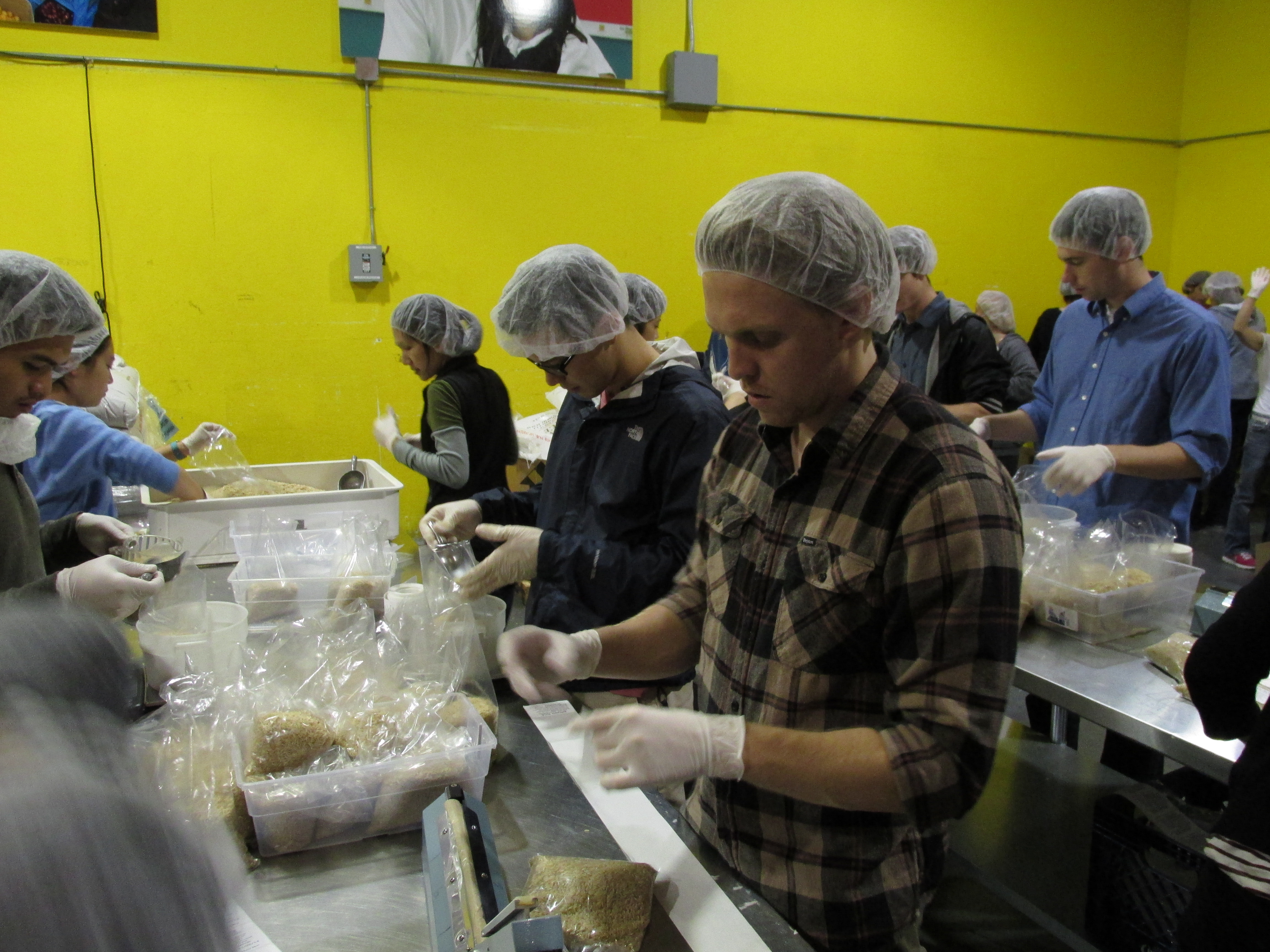
We spent another afternoon up at the SF/Marin Food Bank today. This time, oranges and packaged oats! Was nice to see so many families today -- just regular family outings. The kids really enjoyed doing the hard work, made the time go by quickly.

Here's a linked photo to give you a feel for what the work is like (thank you kqed):


Again, if you are looking for a nice afternoon with friends, family or just on your own; take a weekend morning or afternoon and go help out at the food bank. Your work does feel appreciated and given the magnitude of the operation, this is a good effort for a good cause.

You can easily schedule your time here, although some folks just show up on short notice. Depending on the day, this often just works fine.

Thursday, July 23, 2015

Forwarding CMSensorRecorder results to iPhone for display

My next step in building out a sensor data stream is to send recorded data to the iPhone. The ttl code on github is up to date. Initially this is just displayed on the phone, a bit of a hello world. However, this illustrates a few features and issues:
  • The phone and watch do not have to be connected during the call to transfer data
  • Data split into batches
  • The WCSession callbacks (data sent, error sending)
  • The serialization bug in NSDate in beta3 (send it as string...)
  • Need to figure out why NSString(format: "%s", dataFormatter.stringFromDate()) doesn't encode properly...
Here's a screen shot of what the results look like.  We see the watch processed 4082 events.


And here's the first page of the events as shown on the iPhone.


Next up, get the reader on a background thread, get the serializer working cleaner, perhaps using temporary file transfer, and then send data to Kinesis.  Next, adjust the UI to have an 'enable' recorder feature which will:
  • Kick off the recorder in small batches with a daemon thread to kick off another batch continuously if the enable switch is set
  • Have a periodic dequeue from the sensor IFF the iPhone is reachable (there is a notify for this), only sending the newly available batches.
  • Similarly, the iPhone will queue up this data (using the local Kinesis buffering) for delivery when its network is reachable
At that point there should be a durable delivery chain from watch through phone to AWS...

Tuesday, July 21, 2015

A fix for remote debugging iOS9 WatchOS2 beta3!

Many thanks to dhash. Looks like an upgrade issue, where Xcode 7 isn't quite working when state from prior Xcode exists in local directories.  From Apple Forum Thread:
dhash (edited gm)
Jul 21, 2015 1:08 AM 
I have found the solution to get debug working all the time.
  1. Quit Xcode then go to /Users/<username>/Library/Developer/Xcode/
  2. There should be 2 folders, "Watch OS DeviceSupport" and "watchOS DeviceSupport"
  3. Delete "watchOS DeviceSupport"
  4. Delete all older versions of Xcode DeveloperPortal* files. Keep the DeveloperPortal 7.0.* files.
  5. Open Xcode
  6. Delete derived data in Windows->Projects
  7. Deploy and enjoy debugging 

Now, back to a more regular development pattern!  Productivity should improve now.

Sunday, July 19, 2015

Deeper dive into CMSensorRecorder

I have modified the ttl program to have a little more control over the sensor recorder, its performance, latency, etc. Several guesses:

  • It looks like the recordAccelerometerFor(seconds) method initiates or extends a global record queue. If a new recordAccelerometerFor action is inside a range of a prior action, then effectively nothing changes. It isn't clear to me if other tasks are setting this always. Maybe one of my earlier record functions (at 1 year or 1 day) is still running?!?  Also there doesn't appear to be a stop function
  • Some documents say the maximum record ring is 3 days, others 12 hours. Perhaps it is 12 hours on the watch
  • The visibility of the data appears to be dependent on some background task that will not run when a program is active. If you keep hitting the "process" action, the data doesn't seem to change
  • The data and sensor rate make sense
The code here helps to dig into what is happening (when you don't have a debugger). Here is an operational display (in two screen-shots). Note: there is a slider scrolled off the top of the screen above 'durationMins' used to dial in the duration for the recordAccelerometerFor() method.


Here we see the last time Start was run was 21:45. And 15 minutes later, a press of the 'Process Since' shows 34k events, batch number 21868, the values for the last event and the time range for the events in that block. I do need to figure out what is going on with the min date. Again, probably some fence value; -1 or minDate or something.

So, the sensorRecorder is working -- now need to figure out the best approach to using it.