Wednesday, January 6, 2016

A note on sensor2 dequeue performance

I've examined sensor2 dequeue performance. Some interesting observations indeed!
  • A single dequeue loop (1250 samples for 25 seconds) time takes a bit over 7 seconds
  • A little under 1 second of this time is getting data from CMSensorRecorder
  • Around 4 seconds is required to prepare this data
  • The time to send the samples to DynamoDB depends on the network configuration:
    • 3 - 6 seconds when the Watch is proxying the network through iPhone using LTE network (with a few bars of signal strength)
    • 2 - 4 seconds when the Watch is proxying the network through iPhone (6s plus) and my home WiFi
    • Around 1.5 seconds when the Watch is directly connecting to network using home WiFi

Speeding up the data preparation will help some.  I will set a goal of 1 second:
  • Hard coded JSON serializer
  • Improvements to the payload signer
  • Reduce the HashMap operations (some clever pivoting of the data)

Monday, January 4, 2016

New "serverless" site to explore sensor data

I have updated the UI to parse and render the data from the new data model. You can try it out here.


Recall the data flow is:

  • CMSensorRecorder is activated directly on the Watch
  • When the application's dequeue is enabled, the dequeued events are:
    • Parsed directly into our DynamoDB record format
    • Directly sent to DynamoDB from the Watch
And this pure static website directly fetches those records and pivots the data in a vis.js and d3.js format for display.

Next up:

  • Get AWS Cognito into the loop to get rid of the long lived AWS credentials
  • Work on the iOS framework memory leaks
  • Speed up the dequeue (or, resort to a Lambda raw data processor)

Sunday, January 3, 2016

Progress: CMSensorRecorder directly to DynamoDB

Relative to before, the pendulum has swung back to the other extreme: a native WatchOS application directly writing to AWS DynamoDB.  Here, we see a screen grab with some events being sent:


This has been an interesting exercise. Specifically:
  • With iOS 9.2 and WatchOS 2.1, development has improved
  • However, I can't yet get the AWS iOS SDK to work on the Watch directly
  • So, I have instead written code that writes directly to DynamoDB
    • Including signing the requests
    • Including implementing low level API for batchWriteItem and updateItem
  • I have also redone the application data model to have a single DynamoDB row represent a single second's worth of data with up to 50 samples per row
    • Initially, samples are indexed using named columns (named by the fraction of a second the sample is in)
    • Later this should be done as a more general documentDB record
    • This approach is a more efficient use of DynamoDB -- provisioning required is around 2 writes/second per Watch that is actively dequeuing (compared to 50 writes/second when a single sample is stored in a row)
  • This application also uses NSURLSession directly
  • This means that the Watch can send events to DynamoDB using configured WiFi when the iPhone is out of range!
  • I have also redone the command loop using GCD dispatch queues (instead of threads)
Anyway, it appears to be doing the right thing. Data is being recorded in CMSensorRecorder, the dequeue loop is processing data and transmitting up to 1250 samples (25 seconds) of data per network call. The custom request generator and call signing are doing the right thing. Perhaps a step in the right direction? Not quite sure:
  • I see that the actual on-Watch dequeue processing takes about 6 seconds for 25 seconds worth of data. Since all of the data preparation must occur on the Watch (there is no middle man), the additional work of pivoting the data, preparing the DynamoDB request are borne by the Watch.
  • Profiling shows the bulk of this processing time is in JSON serialization!
  • Another approach would be minimal processing on the Watch.  e.g. "dump the raw data to S3" and let an AWS Lambda take care of the detailed processing. This is probably the best approach although not the cheapest for an application with many users.
  • I'm now running tests long enough to see various memory leaks! I've been spending a bit of time with the memory allocator tools lately...
    • I have run into a few with the NSURLSession object
    • The JSON serializer also appears to leak memory
    • Possibly NSDateFormatter also is leaking memory
Here's what a dequeue loop looks like in the logs. You can see the blocks of data written and the loop processing time:

Jan  3 21:05:11 Gregs-AppleWatch sensor2 WatchKit Extension[152] <Warning>: dequeueLoop(1)
Jan  3 21:05:11 Gregs-AppleWatch sensor2 WatchKit Extension[152] <Warning>: flush itemCount=23, minDate=2016-01-04T05:01:54.557Z, maxDate=2016-01-04T05:01:54.998Z, length=2621
Jan  3 21:05:12 Gregs-AppleWatch sensor2 WatchKit Extension[152] <Warning>: data(Optional("{}"))
Jan  3 21:05:13 Gregs-AppleWatch sensor2 WatchKit Extension[152] <Warning>: commit latestDate=2016-01-04 05:01:54 +0000, itemCount=23
Jan  3 21:05:13 Gregs-AppleWatch sensor2 WatchKit Extension[152] <Warning>: dequeueLoop(2)
Jan  3 21:05:13 Gregs-AppleWatch sensor2 WatchKit Extension[152] <Warning>: flush itemCount=49, minDate=2016-01-04T05:01:55.018Z, maxDate=2016-01-04T05:01:55.980Z, length=5343
Jan  3 21:05:14 Gregs-AppleWatch sensor2 WatchKit Extension[152] <Warning>: data(Optional("{}"))
Jan  3 21:05:14 Gregs-AppleWatch sensor2 WatchKit Extension[152] <Warning>: commit latestDate=2016-01-04 05:01:55 +0000, itemCount=72
Jan  3 21:05:15 Gregs-AppleWatch sensor2 WatchKit Extension[152] <Warning>: dequeueLoop(3)
Jan  3 21:05:20 Gregs-AppleWatch sensor2 WatchKit Extension[152] <Warning>: flush itemCount=1250, minDate=2016-01-04T05:01:56.000Z, maxDate=2016-01-04T05:02:20.988Z, length=88481
Jan  3 21:05:23 Gregs-AppleWatch sensor2 WatchKit Extension[152] <Warning>: data(Optional("{\"UnprocessedItems\":{}}"))
Jan  3 21:05:23 Gregs-AppleWatch sensor2 WatchKit Extension[152] <Warning>: commit latestDate=2016-01-04 05:02:20 +0000, itemCount=1322
Jan  3 21:05:23 Gregs-AppleWatch sensor2 WatchKit Extension[152] <Warning>: dequeueLoop(4)
Jan  3 21:05:30 Gregs-AppleWatch sensor2 WatchKit Extension[152] <Warning>: flush itemCount=1249, minDate=2016-01-04T05:02:21.008Z, maxDate=2016-01-04T05:02:45.995Z, length=88225
Jan  3 21:05:32 Gregs-AppleWatch sensor2 WatchKit Extension[152] <Warning>: data(Optional("{\"UnprocessedItems\":{}}"))
Jan  3 21:05:32 Gregs-AppleWatch sensor2 WatchKit Extension[152] <Warning>: commit latestDate=2016-01-04 05:02:45 +0000, itemCount=2571

And here is what a record looks like in DynamoDB. This shows the columnar encoding of a few of the X accelerometer samples:


I have a checkpoint of the code here. Note that this code is somewhat hard coded for writing only to my one table with only AWS authorizations to write.

TODO:
  • Update the UI to help explore this data
  • See if there is a more efficient use of the JSON serializer
  • Examine some of the framework memory leaks
  • Try to speed up the dequeue to be better than 6 seconds of wall clock for 25 seconds of data.

Thursday, November 19, 2015

CMSensorRecorder from Watch to AWS

I've done a couple of experiments with the direct networking from the WatchOS 2.0 using NSURLSession. Based on the results, I now have a strategy for getting the iPhone out of the loop.

Recall the current plumbing looks like this:

  • CMSensorRecorder data collected in Watch
  • Dequeued by a native application on the Watch
  • Sent via WCSession to iPhone
  • iPhone uses AWS KinesisRecorder to buffer received events
  • KinesisRecorder sends to AWS (using Cognito credentials)
  • Kinesis is dequeued to an AWS Lambda
  • The Lambda stores the records to DynamoDB (using a fixed IAM role)
This is fine, but has a lot of moving parts. And more importantly, Kinesis is provisioned at expected throughput and you pay by the hour for this capacity.

My next experiment will look like this:
  • CMSensorRecorder data collected in Watch
  • Dequeued by a native application on the Watch
  • Sent directly to AWS IoT (using on-watch local long lived IAM credentials)
  • An IoT rule will send these events to Lambda
  • The Lambda stores the records to DynamoDB (using a fixed IAM role)
The important difference here is that IoT is charged based on actual use, not provisioned capacity. This means the effective costs are more directly related to use and not expected use!

Also, the Watch will be able to directly transmit to AWS instead of going through the iPhone (well, it does proxy through its paired phone if in range, otherwise it goes direct via WIFI if a known network is near). This feature will be an interesting proof of concept indeed.

Anyway, for this first experiment the writes to IoT are via http POST (not via MQTT protocol). And authentication is via long lived credentials loaded into the Watch, not Cognito. This is primarily because I haven't yet figured out how to get the AWS IoS SDK to work on the Watch (and the iPhone at the same time). So, I am instead using low-level AWS Api calls. I expect this will change with a future release of the SDK.

I have toyed with the idea of having the Watch write directly to DynamoDB or Lambda instead of going through IoT. Since the Watch is already buffering the sensor data, I don't really need yet another reliable queue in place. Tradeoffs:
  1. Send via IoT
    • + Get Kinesis-like queue for reliable transfer
    • + Get some runtime on IoT and its other capabilities
    • - Paying for another buffer in the middle
  2. Send direct to Lambda
    • + One less moving part
    • - To ensure sending data, need to make a Synchronous call to Lambda which can be delayed when writing to DynamoDB, not sure how well this will work on networks in the field
  3. Send direct to DynamoDB
    • + The lowest cost and least moving parts (and lowest latency)
    • - DynamoDB batch writes can only handle 25 items (0.5 seconds) of data
Note: on DynamoDB, earlier I had discussed a slightly denormalized data storage scheme. One where each second of data is recorded on one dynamoDB row (with separately named columns per sub-second event). Since DynamoDB can do no-clobber updates, this is a nice tradeoff of rows vs data width. This would change the data model and the reader would need to take this into account, but this may make the most sense no matter what. Basically doing this gets better utilization of a DynamoDB 'row' by compacting the data as much as possible. This probably reduces the overall cost of using DynamoDB too as the provisioning would, in general, be reduced. So, I may just re-do the data model and go direct to DynamoDB for this next POC.

Stay tuned!

Thursday, October 29, 2015

Sensor: You Can Try Out Some Real Data

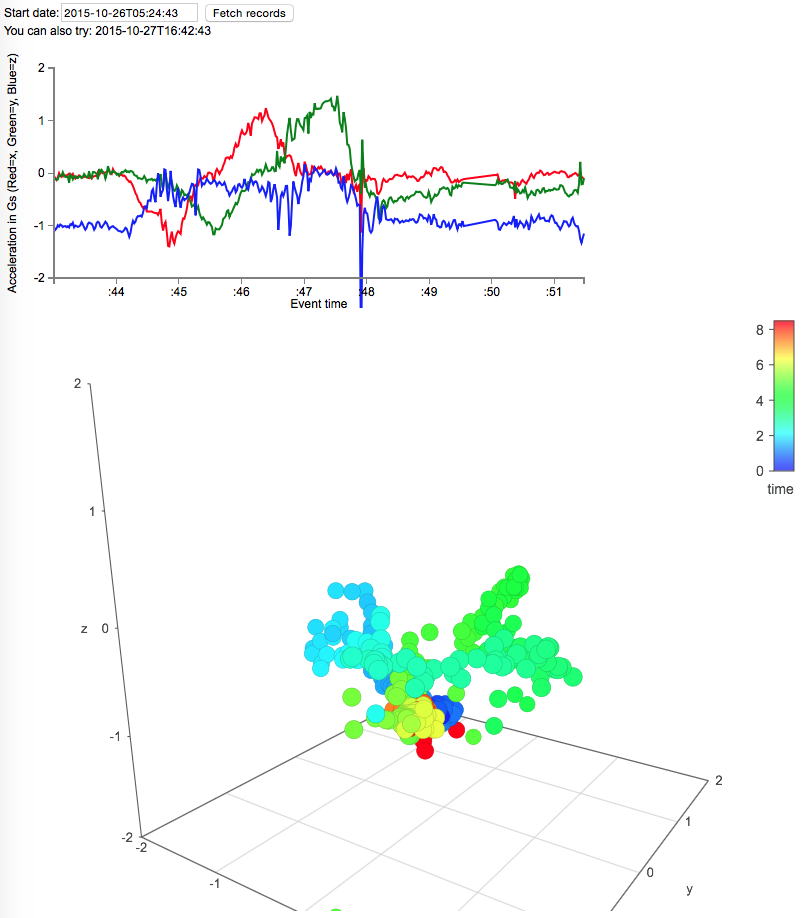
I've set up a rendering of some actual sensor data in a couple of formats:

  • A line chart with X as time and Y as 3 lines of x, y, z acceleration
  • A 3d plot of x, y, z acceleration with color being the sample time
Is interesting to see the actual sensor fidelity in a visual form. CMSensorRecorder records at 50 samples per second and the visualizations are 400 samples or 8 seconds of data.

You can try out the sample here at http://test.accelero.com There are a couple of suggested start times shown on the page.  Enter a time and hit the Fetch button. Recall this fetch button allows the browser to directly query DynamoDB for the sample results. In this case anonymously and hard coded to this particular user's Cognito Id...


Once the results are shown you should be able to drag around on the 3d plot to see the acceleration over time.

The above timeslice is a short sample where the watch starts flat and is rotated 90 degrees in a few steps. If you try out the second sample you will see a recording of a more circular motion of the watch.

Note that d3.js is used for the line charts and vis.js is used for the interactive 3d plot.

Sunday, October 25, 2015

Apple Watch Accelerometer displayed!

There you have it! A journey started in June has finally rendered the results intended. Accelerometer data from the Watch is processed through a pile of AWS services to a dynamic web page.

Here we see the very first rendering of a four second interval where the watch is rotated around its axis. X, Y and Z axes are red, green, blue respectively. Sample rate is 50/second.

The accelerometer data itself is mildly interesting. Rendering it on the Watch or the iPhone were trivial exercises. The framework in place is what makes this fun:
  • Ramping up on WatchOS 2.0 while it was being developed
  • Same with Swift 2.0
  • Getting data out of the Watch
  • The AWS iOS and Javascript SDKs
  • Cognito federated identity for both the iPhone app and the display web page
  • A server-less data pipeline using Kinesis, Lambda and DynamoDB
  • A single-page static content web app with direct access to DynamoDB
No web servers, just a configuration exercise using AWS Paas resources. This app will likely be near 100% uptime, primarily charged per use, will scale with little intervention, is logged, AND is a security first design.

Code for this checkpoint is here.

Friday, October 23, 2015

Amazon's iOS SDK KinesisRecorder: bug found!

Recall earlier posts discussing 50% extra Lambda->DynamoDB event storage. It turns out the problem is the AWS SDK KinesisRecorder running in the iPhone. Unlike the sample code provided, I actually have concurrent saveRecord() and submitAllRecords() flows -- sort of like real world. And this concurrency exposed a problem in the way KinesisRecorder selects data for submit to Kinesis.

Root Cause: rowid is not a stable handle for selecting and removing records.

Anyway, I made a few changes to KinesisRecorder:submitAllRecords(). These changes are mostly to index records by their partition_key. This seems to work ok for me. However, it may not scale for cases where the KinesisRecorder winds up managing a larger number of rows. This needs some benchmarking.

Pull request is here.  And here's updated iPhone code to do the right thing.

As they say "now we're cookin' with gas!"

Here we see the actual storage rate is around the expected 50 per second. The error and retry rates are minimal.

Sooo, back to now analyzing the data that is actually stored in DynamoDB!